How to contribute to documentation
This page describes how to contribute to these online materials documenting the UD guidelines and practices.
Contents:
Quick links to other pages:
Getting Access to Edit
The online documentation is stored on GitHub, a service for projects using the Git version control system. To contribute, you need a GitHub account. (It is free, only takes a minute, and there is a reasonable privacy policy in place.) If you already have a GitHub account, just make sure you are logged in before moving on.
If your GitHub account is a member of the project (specifically, if it is a member of the
Contributors team in the UniversalDependencies organization on GitHub; we have probably
added you to that team if we have created a treebank repository for you), then you have
push access to the pages-source branch of the docs repository
where the source of the UD web is stored. As a maintainer of a language, you can directly
edit pages belonging to that language. If you wish to edit pages outside your language
(that is, in another language or in the general area of the universal guidelines), we suggest
that you propose changes via a pull request rather than editing directly (although technically
your user rights do not prevent you from editing those pages directly). Even within “your”
language, you should be careful if there are multiple treebanks in that language and you do not
maintain all of them (see guidelines on language-specific documentation
for details).
Editing online
GitHub provides basic online editing functionality. The interface looks something like this:
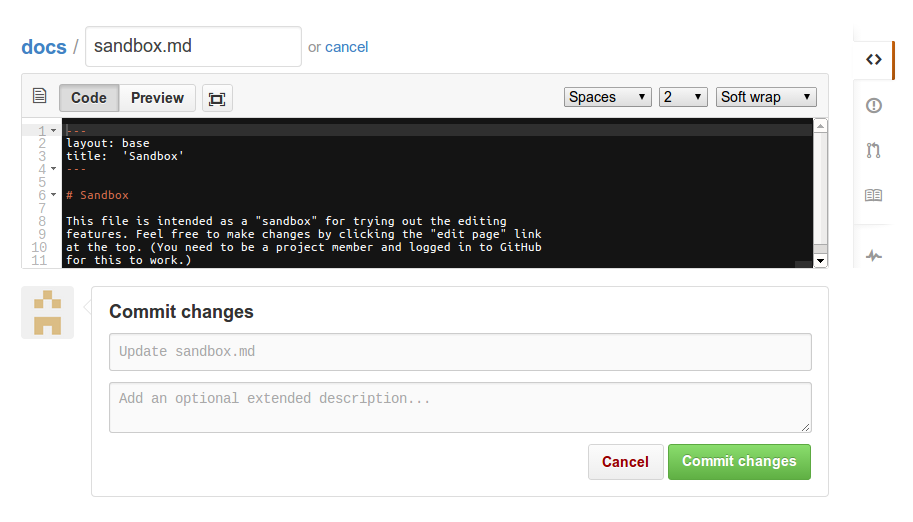
To get started, the only relevant parts are the large black edit area and the “Cancel” and “Commit changes” buttons at the bottom.
To give this a quick try, click on the following link: edit sandbox document. This opens a “sandbox” document in a new tab. After testing it out, feel free to either cancel without saving your changes, or save them into the version control system using the “Commit changes” button. You can see the resulting document here (reload to see changes, and please note it may take some time for the changes to show up.)
For experimenting with the system, we recommend using the sandbox document instead of the “real” documents.
To edit the actual documentation, first find the page you are
interested in. For example, to navigate to the documentation for the
English language obj (direct object) dependency:
- Start from the homepage (https://universaldependencies.org/)
- Click on the “Annotation guidelines” link (go to https://universaldependencies.org/guidelines.html)
- In the list of language-specific guidelines, locate English (go to https://universaldependencies.org/en/index.html)
- In the “Syntax” section, click on “English relations” (go to https://universaldependencies.org/en/dep/index.html)
- Click on the “obj” link (go to https://universaldependencies.org/en/dep/obj.html)
Then, edit and save your changes:
- Click on the “edit page” link on the top
- Make your changes in the GitHub editor
- (Optional: add a message describing your changes in the “Commit changes” box)
- Click on “Commit changes”
Finally, wait a moment for your revisions to the documentation to be compiled (normally no more than 2 minutes) and reload the documentation page to make sure they look right.
Using Git
As an alternative to using the online editing features, you can also edit the materials using the Git version control system as described in this section.
If you are not previously familiar with Git, please see GitHub instructions on setup and basic use. The rest of this section assumes that you have git set up and are working on a terminal in a unix-like environment. For other use cases, please see GitHub documentation.
The project materials are found in the repository https://github.com/universaldependencies/docs. To check out these materials from GitHub, run the following command:
git clone git@github.com:UniversalDependencies/docs.git
If successful, this will create the subdirectory docs/ containing
the data of the repository in your current directory. You can then
edit the files in the repository normally, using your favorite text
editor. After completing a set of changes, you can commit the changes
with the command
git commit -a -m 'Insert a short message describing your changes here.'
and push them to the shared online repository with
git push
If you see the error error: failed to push some refs, it’s likely
that others pushed changes to the shared online repository while you
were working. You can retrieve these changes and merge them with
yours with the command
git pull
This covers the very basics only. Please see the extensive materials available online at GitHub and elsewhere for details.
Technical note: please do not commit anything into any branch other than pages-source.
(If this note makes no sense to you, don’t worry – you cannot do this by accident.)
Non-members
Although only members of this project can directly edit the online materials, you do not need to be a member to contribute. Non-members can either file issues on the project issue tracker, or submit proposed changes as pull requests.
Filing issues
To file bug reports, feature requests, suggestions for improvement, etc., you can use the project issue tracker: https://github.com/universaldependencies/docs/issues.
The issue tracker is open to members and non-members alike, and can be used to let (other) project members know of any issue with the online documentation, including technical problems, mistakes in the descriptions or examples, or suggestions for how to improve any aspect of the project.
Any issues related to documentation and guidelines, even specific to one language, belong to the issue tracker of the docs repository. Issue trackers of individual treebank repositories should be used only to report bugs in those treebanks. You can also send an e-mail to the UD mailing list; however, the list is primarily meant for announcements for data maintainers.
Editing
File format
The online documentation is generated from a simple format that largely resembles plain text.
The format is called Markdown
(see also GitHub Markdown Basics and
GitHub Flavored Markdown).
It can be mixed freely with inline HTML. The only exception is the format used for embedding
visualizations, which is supported as an extension specific to this
project. To embed a visualization represented in the Stanford
Dependency format, simply wrap it in lines with ~~~ sdparse and
~~~, or, correspondingly, wrap in HTML tags <div class="sd-parse"> and </div>;
more details below.
The documentation system also supports linking of pages in collections
using a compact syntax: for example, [u-dep/aux]() expands into
the following link: u-dep/aux
For more detail, you can see the documentation for the Markdown syntax and embedded visualizations.
Links to documentation
The system supports a simplified syntax for linking documentation pages that are part of a collection (e.g. universal dependency types, UPOS tags, etc.).
The basic syntax is [COLL/DOC](), where COLL is the collection
name and DOC the document title. For example, [u-dep/aux]() is
linked as follows: u-dep/aux.
The shorter form [DOC]() (omitting the collection) can be used when
referring to another document in the current collection (e.g. linking
between different documents in the u-dep collection) or when the
document title is unique. For example, [acl:adv]() can be assured
to link to acl:adv as the type is unique to the Ukrainian
annotation. If the label is not unique, the link will lead to one of
such documents in a random collection. For example, [advcl:cond]()
is currently available for Abkhaz, Sanskrit, Tamil, Telugu, and Uyghur.
When used outside these collections, advcl:cond will point randomly
at one of them. If we want to point to the documentation of that relation
in a particular language, we have to use the fully specified link, i.e.,
[advcl:cond](/ta/dep/advcl-cond.html).
Style guidelines
See also the guidelines for language-specific documentation. To maintain the consistency of the documentation, please follow these guidelines:
- All types / labels (POS tags, feature names/values, relation labels) are in
constant width font. To achieve this, use either a documentation link (see below), or backticks in Markdown (e.g. `nsubj`) or<code>in HTML (e.g.<code>nsubj</code>). - The first mention of any type other than the one that is the focus of the page
(the titular one) is linked to the relevant page of documentation. For example,
on the page for
nsubj, write “`nsubj`” and “[case]()”. Repeated mentions of the same type may be optionally be linked (if they are too far apart, it makes sense to hyperlink again, but it does not make sense to highlight several occurrences in the same paragraph) - Examples in a foreign language should be followed by an English translation, which is not italicized but it is enclosed in quotes, e.g. der Mann “the man”.
- Note that Markdown processing converts straight ASCII quotes (") to typographic (directional) quotation marks (“”), which should be used for all quotes.
- Examples given in a foreign script are only italicized if it is Cyrillic, Greek or Armenian.
(In some scripts italics don’t look nice and the foreign script highlights the word anyway.)
They should be immediately followed by a Latin-based transliteration, which is in italics.
The transliteration is separated from the original script by a slash, which is not italics.
- Иван лучший танцор / Ivan lučšij tancor “Ivan is the best dancer”
- Ο Νίκος είναι πάνω / O Nikos einai panô “Nikos is up”
- Արամը ազնիվ մարդ է / Aramă azniv mard é “Aram is an honest man”
- राम इवान से भी बेहतर है / rāma ivāna se bhī behatara hai “Ram is even better than Ivan”
- To emphasize part of an example, use the
<b>tag. For example,_<b>Which</b> car_renders as follows: Which car.- To emphasize text that is not part of an example, use
_light emphasis_(rendering as light emphasis) or**heavy emphasis**(heavy emphasis), but not the<b>tag.
- To emphasize text that is not part of an example, use
- If an in-line example shall contain a verbose translation, it is also italics and without quotes,
separated by the non-italics abbreviation “lit.” Multi-word expressions that correspond to one
token in the original language are joined by a hyphen. The verbose translation is followed by
a fluent English translation in its usual format.
- Seděla na lavičce pod mostem. lit. She-sat on bench under bridge. “She was sitting on a bench under the bridge.”
- If it is necessary / expedient to identify the language of the example, it is either identified in plain English (such as German ich bin gekommen “I have come”) or the ISO 639 language code in square brackets is used as shortcut (such as [de] ich bin gekommen “I have come”).
Visualization of Syntactic Trees
See also a separate page with documentation and visualization system introduction.
The embedded visualizations are generated from representations in the Stanford Dependency or CoNLL-U formats, each of which can be created and edited manually or copied in from the output of relevant tools.
For example, the following:
A copula is the relation between the complement of a copular verb and the copular verb to be (only). (We normally take a copula as a dependent of its complement.)
Bill is an honest man
cop(man, is)
Ivan is the best dancer
nsubj(dancer-5, Ivan-1)
cop(dancer-5, is-2)
det(dancer-5, the-3)
amod(dancer-5, best-4)
The copula be is not treated as the head of a clause, but rather the dependent of a lexical predicate, as exemplified above.
is generated from this input:
A copula is the relation between the complement of a copular verb and
the copular verb *to be* (only).  (We normally take a copula as a dependent of its
complement.)

~~~ sdparse
Bill is an honest man
cop(man, is)
~~~

~~~ sdparse
Ivan is the best dancer
nsubj(dancer-5, Ivan-1)
cop(dancer-5, is-2)
det(dancer-5, the-3)
amod(dancer-5, best-4)
~~~

The copula *be* is not treated as the
head of a clause, but rather the dependent of a lexical predicate, as exemplified above.
Things to Avoid
There are several things you should never do although the system will not prevent you from doing them. Each of them results in breaking functionality of the UD infrastructure for other users! Fortunately, GitHub keeps the edit history and it is possible to revert damage you do by mistake; but you will be better liked if you avoid such mistakes.
Do not create AUX.md (nor aux.md)
It must be possible to clone the repository on any operating system. Unfortunately, some file names
are banned on some systems. Specifically, on Microsoft Windows, the part of the file name before the
period (and the extension) must not be AUX or aux. You may be tempted to create AUX.md to document
the AUX UPOS tag or aux.md to document the dependency relation, and GitHub would allow you to
do so, but do not do it – people who access GitHub from Windows would no longer be able to pull the
updated version. The workaround we use is to add an underscore to the name (AUX_.md or aux_.md)
and inside the MarkDown header, specify redirection so that browsers can still access the page as
AUX.html
Here is an example of the redirect line to be put to the MarkDown header (replace “cs” with the code of the language you are documenting):
redirect_from: "cs/pos/AUX.html"
Do not use Jekyll directives
The website is built from the MarkDown sources using software called Jekyll and the source files can, besides plaintext, MarkDown and HTML, contain also code that will be interpreted by Jekyll. Do not use them. Jekyll is very fragile and if it finds a directive that it cannot fulfill, it will break. From that point on, the entire UD website will not be updated and will not reflect edits that you and other users make, until someone fixes the error.
WARNING: If you create your pages by editing pages copied from another language, you may encounter a Jekyll directive that other people have inserted in their page. The fact that it worked for them does not necessarily mean that it is safe for you to use it, too. For example, the following are Jekyll include directives that occur in language-specific documentation of some languages (here in Czech):
{% include cs-pos-table.html %}
{% include cs-feat-table.html %}
{% include cs-dep-table.html %}
If you copy them to language with code xx and simply replace cs with xx, it will not work because
Jekyll will not find the HTML file to be included. It will crash and the website will stop updating.
Fortunately, you do not need to use this include directive that is used in old pages. You can provide the lists of UPOS tags, features and relations directly in the index of your language-specific documentation.
Be careful with language-specific documentation
Some pages in the language-specific documentation are read by the validation infrastructure. If you make a mistake and the validator cannot find the information it is looking for, treebanks may become invalid and unreleasable. This is a larger problem if your treebank is not the only treebank of that language: Now you are endangering other people’s work.
For more details, see language-specific documentation.
Do not edit automatically generated pages
Large parts of the UD website are generated by scripts from the treebank data or from other sources within the UD infrastructure. They are typically updated when a new data release is prepared. Editing such pages manually is not a good idea – anything you do will be overwritten next time when the scripts are run.
Most of the automatically generated pages reside under the treebanks folder in the docs repository.
The entire subtree of this folder is a no-go zone where you should not edit anything. If you see
inaccurate information about your treebank, edit the README.md file in your treebank repository.
The information has been copied from there and will be copied again when the next release is built.
Similarly, the treebank information on the homepage is taken from the treebank repositories. There are also automatically collected lists of features, relations, and MISC attributes used in the data.
There are other parts of the documentation pages that are generated automatically, such as cross-lingual links at the bottom of pages describing individual tags, features, and relations. These are added to the page by Jekyll and they should be updated at release time as well. (Anyway, for these parts it is much less obvious how you could change them, so it is not likely that you will edit them by mistake.)